> For the complete documentation index, see [llms.txt](https://tagomisystems.gitbook.io/tagomi-docs/llms.txt). Markdown versions of documentation pages are available by appending `.md` to page URLs; this page is available as [Markdown](https://tagomisystems.gitbook.io/tagomi-docs/tagomi-1/overview/distributions.md).
# Distributions
The introduction of Distributions marks a significant advancement in DeFi applications, offering a scalable method for one-to-many fund transfers. Distributions allow for the transfer of value to multiple recipients with minimal on-chain data modification, making them infinitely scalable, highly efficient and gas-friendly.
note
There are other on-chain solutions that may seem to solve this problem without using a new token implementation (e.g [Disperse App](https://disperse.app/)). While these solutions can be great for a low amount of recipients, they are not infinitely scalable and can become very expensive as the number of recipients increases. Furthermore, they do not allow for distributing money streaming
### Overview[](https://docs.superfluid.finance/docs/concepts/overview/distributions#overview)
Distributions function by allowing for the creation of **pools** with a designated **pool admin** who manages **units** for **pool members**. Members of these pools can receive funds either instantly or through continuous streaming, making this method highly efficient and scalable. There are two types of Distributions:
* **Instant Distributions**: They allow one transaction distribution to any number of receivers with a fixed gas cost.
* **Streaming Distributions**: They allow for continuous distribution of funds to receivers through Money Streaming to a Pool.
***
* Instant Distribution
* Streaming Distribution
**Instant Distributions** allow one transaction to distribute to any number of receivers with a fixed gas cost.
*Click on the Blue Circle to initiate an Instant Distribution*
\
Distribution PoolClick to distribute a tokenMember AMember BMember CMember DMember E
*By creating a Distribution Pool, you can distribute any token instantly*
***
#### Definitions[](https://docs.superfluid.finance/docs/concepts/overview/distributions#definitions)
* **Pool**: A channel for proportional token distribution.
* **Distribution**: The action of allocating specified token amounts to receivers.
* **Units**: Represent the proportion of the distribution each subscriber receives.
* **Pool Admin**: The administrator of the distribution process.
* **Subscribers/Pool Member**: Receivers allocated units and eligible to receive tokens through the Index.
#### Key Features[](https://docs.superfluid.finance/docs/concepts/overview/distributions#key-features)
* **Pools as Contracts**: Unlike previous approaches, pools in streaming distributions are contracts and can be ERC20 tokens. This allows pool members to transfer units among themselves, which wasn't possible earlier.
* **Roles and Permissions**: A pool admin can grant and revoke units, while any account can act as a **distributor** to execute fund distributions.
* **Distribution Methods**: There are two primary ways to distribute funds:
* **Instant Distribution**: Calculated as `distributionAmount * (poolMemberUnits / poolTotalUnits)`.
* **Streaming Distribution**: Determined by `poolFlowRate * (poolMemberUnits / poolTotalUnits)`.
* **Gas Efficiency**: The cost of executing distributions remains constant, regardless of the number of pool members.
#### High-Level Workflow[](https://docs.superfluid.finance/docs/concepts/overview/distributions#high-level-workflow)
1. **Pool Creation**: Any account can create a pool and appoint a pool admin. This pool acts as a channel for distributing funds.
2. **Unit Management**: The pool admin assigns units to members, representing their share in future distributions.
3. **Member Connection**: Pool members can connect to or disconnect from the pool, affecting how they access distributed funds.
4. **Distribution Execution**: Distributors can initiate either instant or streaming distributions, which are then divided among pool members based on their unit share.
### Distribution Examples[](https://docs.superfluid.finance/docs/concepts/overview/distributions#distribution-examples)
#### Streaming Distribution Illustration[](https://docs.superfluid.finance/docs/concepts/overview/distributions#streaming-distribution-illustration)
This diagram shows a distributor streaming funds to various pool members, each holding different unit amounts. Note: A single transaction can cater to multiple members.
#### Adjusting Unit Counts[](https://docs.superfluid.finance/docs/concepts/overview/distributions#adjusting-unit-counts)
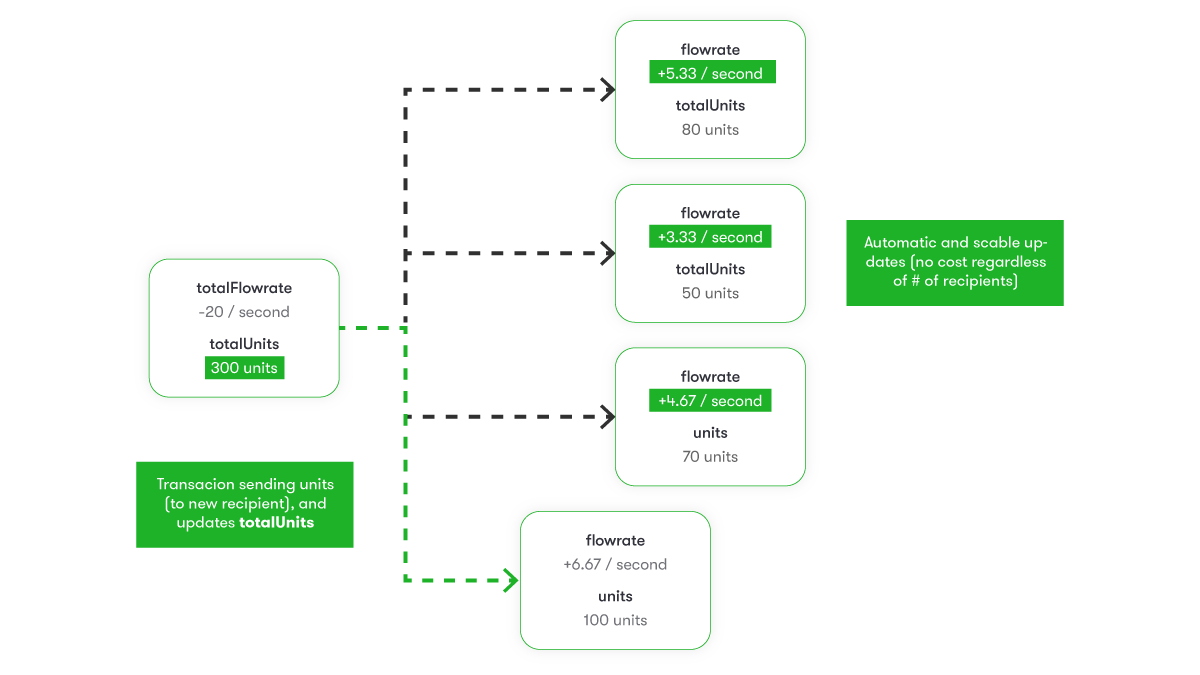
Here, a distributor modifies unit counts for members. This change instantly alters the distribution rate for all members in one transaction. Batch updates can be done using Tagomi's batch call.
#### Modifying the Flow Rate[](https://docs.superfluid.finance/docs/concepts/overview/distributions#modifying-the-flow-rate)
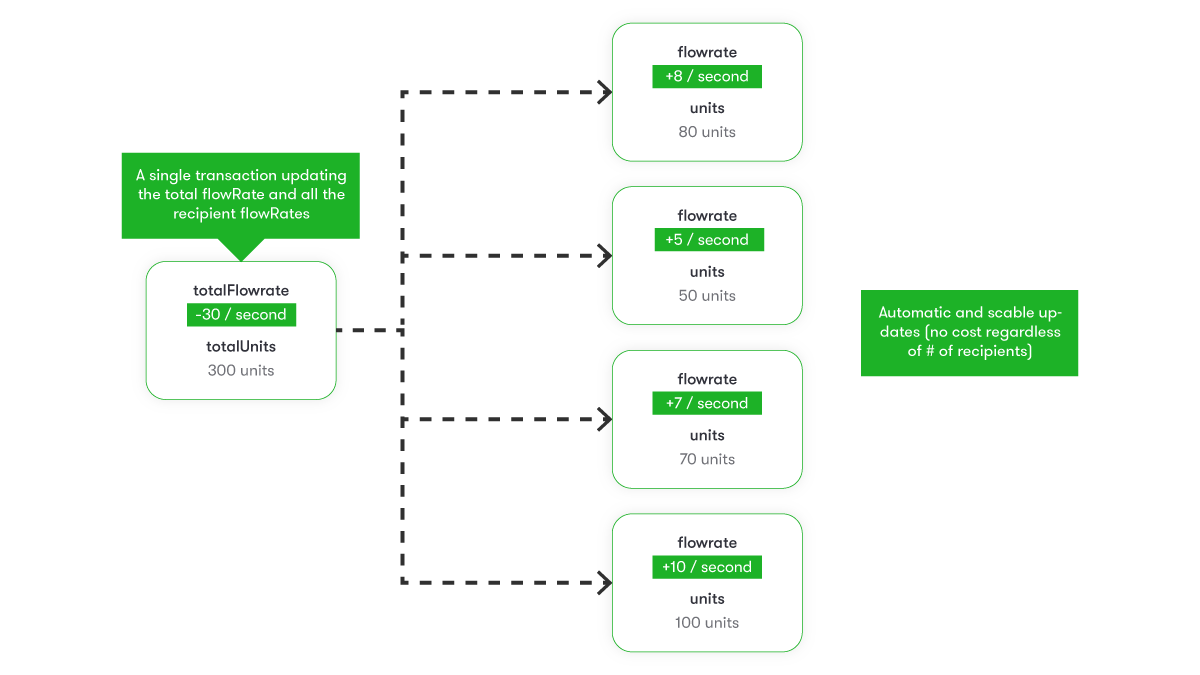
This example demonstrates how a change in the distributor's streaming rate affects the total flow rate of the pool, thus instantly impacting each member's rate.
### Advanced Pool Features[](https://docs.superfluid.finance/docs/concepts/overview/distributions#advanced-pool-features)
As pools are also ERC20 tokens, they enable:
* **Transfer of Units**: Pool members can freely transfer their units.
* **Delegated Transfers**: Using the `approve` and `transferFrom` functions, units can be transferred on behalf of a member.
These features add composability and flexibility, expanding the potential use cases for pools in web3.
---
# Agent Instructions
This documentation is published with GitBook. GitBook is the documentation platform designed so that both humans and AI agents can read, navigate, and reason over technical content effectively. Learn more at gitbook.com.
## Querying This Documentation
If you need additional information that is not directly available in this page, you can query the documentation dynamically by asking a question.
Perform an HTTP GET request on the current page URL with the `ask` query parameter, and the optional `goal` query parameter:
```
GET https://tagomisystems.gitbook.io/tagomi-docs/tagomi-1/overview/distributions.md?ask=&goal=
```
`ask` is the immediate question: it should be specific, self-contained, and written in natural language.
`goal` is optional and describes the broader end goal you are ultimately trying to accomplish on behalf of the user. GitBook uses it to tailor the answer towards what is most useful for that goal.
The response will contain a direct answer to the question and relevant excerpts and sources from the documentation.
Use this mechanism when the answer is not explicitly present in the current page, you need clarification or additional context, or you want to retrieve related documentation sections.

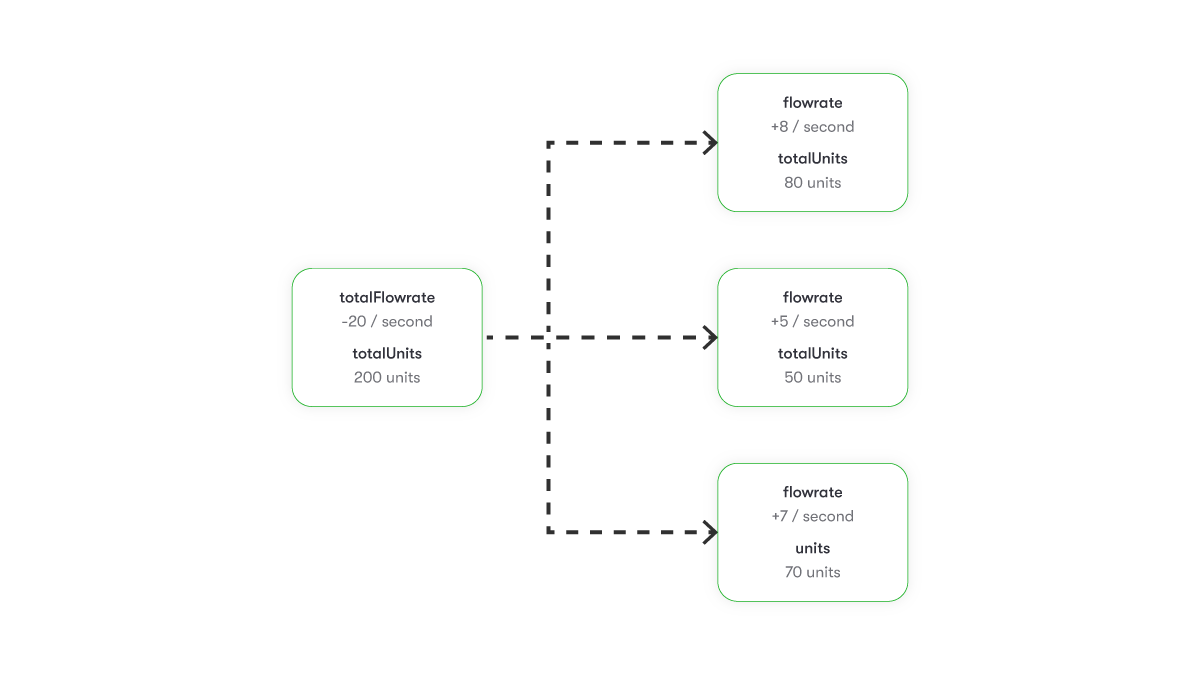 #### Adjusting Unit Counts[](https://docs.superfluid.finance/docs/concepts/overview/distributions#adjusting-unit-counts)
Here, a distributor modifies unit counts for members. This change instantly alters the distribution rate for all members in one transaction. Batch updates can be done using Tagomi's batch call.
#### Adjusting Unit Counts[](https://docs.superfluid.finance/docs/concepts/overview/distributions#adjusting-unit-counts)
Here, a distributor modifies unit counts for members. This change instantly alters the distribution rate for all members in one transaction. Batch updates can be done using Tagomi's batch call.
 #### Modifying the Flow Rate[](https://docs.superfluid.finance/docs/concepts/overview/distributions#modifying-the-flow-rate)
This example demonstrates how a change in the distributor's streaming rate affects the total flow rate of the pool, thus instantly impacting each member's rate.
#### Modifying the Flow Rate[](https://docs.superfluid.finance/docs/concepts/overview/distributions#modifying-the-flow-rate)
This example demonstrates how a change in the distributor's streaming rate affects the total flow rate of the pool, thus instantly impacting each member's rate.
 ### Advanced Pool Features[](https://docs.superfluid.finance/docs/concepts/overview/distributions#advanced-pool-features)
As pools are also ERC20 tokens, they enable:
* **Transfer of Units**: Pool members can freely transfer their units.
* **Delegated Transfers**: Using the `approve` and `transferFrom` functions, units can be transferred on behalf of a member.
These features add composability and flexibility, expanding the potential use cases for pools in web3.
---
# Agent Instructions
This documentation is published with GitBook. GitBook is the documentation platform designed so that both humans and AI agents can read, navigate, and reason over technical content effectively. Learn more at gitbook.com.
## Querying This Documentation
If you need additional information that is not directly available in this page, you can query the documentation dynamically by asking a question.
Perform an HTTP GET request on the current page URL with the `ask` query parameter, and the optional `goal` query parameter:
```
GET https://tagomisystems.gitbook.io/tagomi-docs/tagomi-1/overview/distributions.md?ask=
### Advanced Pool Features[](https://docs.superfluid.finance/docs/concepts/overview/distributions#advanced-pool-features)
As pools are also ERC20 tokens, they enable:
* **Transfer of Units**: Pool members can freely transfer their units.
* **Delegated Transfers**: Using the `approve` and `transferFrom` functions, units can be transferred on behalf of a member.
These features add composability and flexibility, expanding the potential use cases for pools in web3.
---
# Agent Instructions
This documentation is published with GitBook. GitBook is the documentation platform designed so that both humans and AI agents can read, navigate, and reason over technical content effectively. Learn more at gitbook.com.
## Querying This Documentation
If you need additional information that is not directly available in this page, you can query the documentation dynamically by asking a question.
Perform an HTTP GET request on the current page URL with the `ask` query parameter, and the optional `goal` query parameter:
```
GET https://tagomisystems.gitbook.io/tagomi-docs/tagomi-1/overview/distributions.md?ask=